
Smart crop, gravity, and automatic border trim
When an input image’s aspect ratio differs from the target card, libvips offers two content-aware cropping capabilities beyond simple centre cropping:
- Smart focal cropping (
smartcrop/Interesting): evaluates Shannon information entropy (entropy) or visual salience (attention) to locate and keep the most informative rectangle. - Automatic solid/transparent border trimming (
find_trim/trim): detects uniform margins matching a background colour and returns the tight bounding box(left, top, width, height)— ideal for e-commerce product shots and padded icons.
Comparing centre, directional, and entropy crops
Section titled “Comparing centre, directional, and entropy crops”These three 600 × 300 outputs are generated from the same 1938 × 1292 source photograph, comparing geometric centre (centre), low-coordinate gravity (north / low), and entropy-guided cropping (entropy):
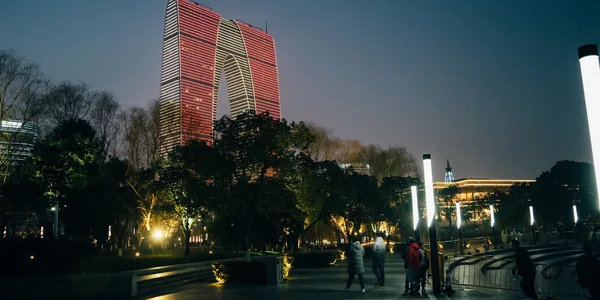
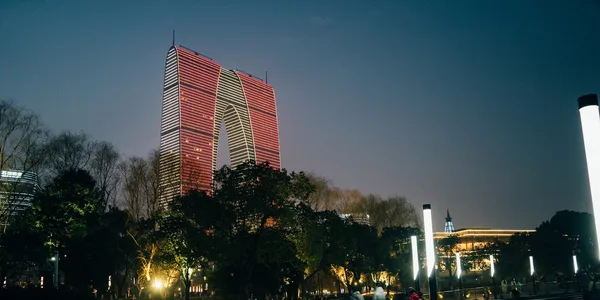
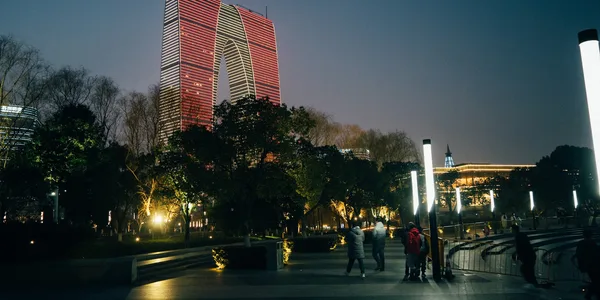
Standalone SmartCrop (Entropy vs Attention)
Section titled “Standalone SmartCrop (Entropy vs Attention)”When you need content-aware cropping directly on an open image (outside of a thumbnail loader), call SmartCrop (vips_smartcrop):
InterestingEntropy(entropy): divides the image into sections, measures Shannon entropy, and keeps the region with the richest edge and texture detail.InterestingAttention(attention): weights high saturation, luminance contrast, and skin-tone heuristics, making it well suited for portraits and focal subjects.
package main
import (    "fmt"    "os"
    "github.com/davidbyttow/govips/v2/vips")
func main() {    if err := vips.Startup(nil); err != nil {        fmt.Fprintln(os.Stderr, err)        os.Exit(1)    }    defer vips.Shutdown()
    image, err := vips.NewImageFromFile("input.jpg")    if err != nil {        fmt.Fprintln(os.Stderr, err)        os.Exit(1)    }    defer image.Close()
    // Crop a 600×300 region around the highest visual attention area    if err := image.SmartCrop(600, 300, vips.InterestingAttention); err != nil {        fmt.Fprintln(os.Stderr, err)        os.Exit(1)    }
    data, _, err := image.ExportWebp(vips.NewWebpExportParams())    if err != nil {        fmt.Fprintln(os.Stderr, err)        os.Exit(1)    }    if err := os.WriteFile("smart-attention.webp", data, 0o644); err != nil {        fmt.Fprintln(os.Stderr, err)        os.Exit(1)    }}
import sharp from 'sharp';
// Pass sharp.strategy.attention or sharp.strategy.entropy via resize({ fit: 'cover', position })const { data, info } = await sharp('input.jpg') .resize(600, 300, { fit: 'cover', position: sharp.strategy.attention, }) .webp({ quality: 82 }) .toBuffer({ resolveWithObject: true });
// info.cropOffsetLeft and info.cropOffsetTop report the selected crop originconsole.log(info.cropOffsetLeft, info.cropOffsetTop, data.byteLength);import pyvips
image = pyvips.Image.new_from_file("input.jpg")
# Call smartcrop directly with interesting="entropy" or "attention"cropped = image.smartcrop(600, 300, interesting="attention")cropped.write_to_file("smart-attention.webp", Q=82)#!/usr/bin/env bashset -euo pipefail
vips smartcrop input.jpg 'smart-attention.webp[Q=82]' 600 300 --interesting attentionCross-binding Interesting mapping
Section titled “Cross-binding Interesting mapping”| Crop focus intent | govips vips.Interesting |
sharp position |
pyvips / vips CLI |
|---|---|---|---|
| Do not crop (proportional fit) | vips.InterestingNone |
fit: 'inside' |
"none" |
| Geometric centre | vips.InterestingCentre |
'centre' / 'center' |
"centre" |
| Bias toward low coordinates (top or left) | vips.InterestingLow |
'north' or 'west' |
"low" |
| Bias toward high coordinates (bottom or right) | vips.InterestingHigh |
'south' or 'east' |
"high" |
| Highest Shannon entropy | vips.InterestingEntropy |
sharp.strategy.entropy / 'entropy' |
"entropy" |
| Highest visual salience | vips.InterestingAttention |
sharp.strategy.attention / 'attention' |
"attention" |
Automatic solid or transparent border trimming (FindTrim / trim)
Section titled “Automatic solid or transparent border trimming (FindTrim / trim)”To strip uniform white, coloured, or transparent borders around product photographs or scanned documents, use find_trim to locate the bounding box (left, top, width, height) of non-background pixels:
govips,pyvips, andvips CLIuse a two-step pattern: callFindTrim/find_trimto compute the bounding box, check thatwidth > 0 && height > 0, and then callExtractArea/crop.sharpprovides a single-step.trim({ background, threshold })method and reportstrimOffsetLeftandtrimOffsetTopinOutputInfo.
// Locate the bounding box where pixels differ from white (#FFFFFF) by more than threshold=10bg := &vips.Color{R: 255, G: 255, B: 255}left, top, width, height, err := image.FindTrim(10.0, bg)if err != nil {    return err}if width <= 0 || height <= 0 {    return fmt.Errorf("entire image matched background threshold")}
// Crop to the detected bounding boxif err := image.ExtractArea(left, top, width, height); err != nil {    return err}
import sharp from 'sharp';
const { data, info } = await sharp('input.jpg') .trim({ background: '#ffffff', threshold: 10, }) .webp({ quality: 82 }) .toBuffer({ resolveWithObject: true });
console.log(`trimmed to ${info.width}x${info.height} (offset ${info.trimOffsetLeft},${info.trimOffsetTop})`);import pyvips
image = pyvips.Image.new_from_file("input.jpg")left, top, width, height = image.find_trim(threshold=10, background=[255, 255, 255])
if width > 0 and height > 0: trimmed = image.crop(left, top, width, height) trimmed.write_to_file("trimmed.webp", Q=82)# vips find_trim prints left, top, width, and height on four linesread -r LEFT TOP WIDTH HEIGHT < <( vips find_trim input.jpg --threshold 10 --background 255,255,255 | tr '\n' ' ')vips crop input.jpg 'trimmed.webp[Q=82]' "$LEFT" "$TOP" "$WIDTH" "$HEIGHT"